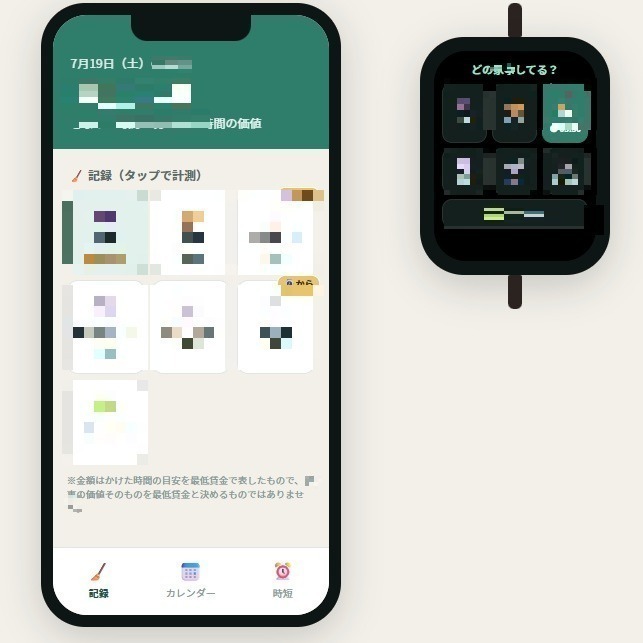
I wanted to put a screenshot of the app I am building on the blog. Partly to keep a record of the development, partly so that anyone reading could get a feel for it — “this is the sort of thing I am making.”
So I got one screenshot ready. But I could not post it as it was.
The app screen showed parts I did not want public yet — the kind of detail that gives away what the idea actually is. I needed to hide only those parts and keep the general atmosphere. What people call a mosaic, or a blur.
This is the story of asking my AI partner Kuro (Claude) to do that for me. And it turned into a story about something AI is surprisingly bad at.
“Hide this bit for me”
The method was the same as always. Hand the image to Kuro and ask in plain words. “Hide this number.” “Hide this row of buttons.” I just said out loud which places I wanted covered. No code, no image editing software.
Kuro came back with this.
Got it. I will put a mosaic over the spots you listed. Let me look at the image first, then process it.
The first attempt was decent. The places I wanted hidden had a mosaic on them. “Oh, it can do this,” I thought. Up to here it had taken only a few minutes.
But everything was slightly off
Looking closer, things were hidden — but not quite hidden. “Only the right half of that character is covered.” “That one is shifted one character to the right.” Those almost-there misses were scattered all over the image.
What followed was a long stretch of teamwork. I would say “a little more to the left,” “widen it by another one and a half characters,” “make it a bit stronger,” and Kuro would fix it. Then I would look again and report back: “that one is covered now,” “that one is still half showing.” We went round and round like this, many times over.
Sorry, that was shifted a little to the right. I will move it one character to the left.
Kuro never once pulled a face — AI does not have a face — and stuck with it patiently. In the end everything I wanted hidden was cleanly hidden, and the image still carried the feel of the app. The picture above is that finished version.
Five minutes of work. Terrible fuel economy.
Here is the part I found interesting, and honestly a little surprising.
The time I actually spent moving my hands was maybe five minutes. If a person did this in an image editor, it would be a quick pass with the mosaic tool and done. That kind of job.
And yet those five minutes of back-and-forth chewed through my AI usage at quite a rate. AI has a ceiling on how much you can use in a day, or over a given period. When I have it write text, that number barely moves. This image session drained it noticeably. Short job, very poor fuel economy.
Kuro was honest about why.
I will be straight with you. Putting a mosaic directly onto an image is not something I am good at. I am bad at “seeing” an image and pinning down exactly where to cover, so I could only get it right by borrowing your eyes — you telling me “that one is covered,” “that one is still half showing.”
“Fast” and “good at it” turn out to be different things
This experience settled something in my head.
I had a picture of AI as a magic tool that does everything quickly and well. In practice it is not like that.
Writing text, looking things up, tidying up ideas — that kind of work with words, it really is fast and really is good. But work with eyes, looking closely at an image and matching a position to within a millimetre, turned out to be surprisingly clumsy. The same AI has jobs it is good at and jobs it is bad at.
And the important part is that a person could cover the weak spot. Kuro is bad at locating the place, but accurate at making the correction it is told to make. I can spot that something is off. Put the two sets of eyes together and we reached the goal.
If I had left the whole thing to the AI on its own, it probably would never have come out right. And if I had wrestled with image software by myself, that would have taken its own kind of time. It only became a five-minute job because each of us brought what we were good at.
What I take away from it
- Before posting a screenshot of my app, I had the AI put a mosaic over just the parts I wanted hidden.
- The first attempt was decent, but there were a lot of almost-there misses, so we repeated a cycle of “a bit more to the left,” “make it wider.”
- The actual work took about five minutes. For that, it ate a serious amount of AI usage — tokens. Fast, but poor fuel economy.
- AI is good at work with words, and bad at looking at an image and pinning down an exact position.
- The weak spot could be covered by a person’s eyes. It came out right precisely because we did it as a pair.
AI is not all-powerful. But once you start to see where it is strong and where it is weak, you get better at working with it. Where it is weak, you just lend it a hand. Those five minutes of mosaic work reminded me of that.
If you want to know why image work burns usage so quickly, I wrote about the mechanism in how AI tokens and images actually work, and about the jobs that drain it fastest in three tasks that eat AI usage.