Last time I wrote about how a working prototype appeared just from talking. But between a prototype that runs on my computer and a real app you can install on a phone there is quite a gap, and today is the story of closing it in one go, with my AI partner Kuro (Claude).
Let me say it up front. I cannot program, not a single line. And yet today my app ran on a real phone screen, with an ad showing on it. It took half a day, and I tripped over things again and again.
A prototype and an app are two different things
What I had so far was a single file that runs when you open it on a computer. Useful in its own way, but to put it in a phone app store it has to be converted into “the shape of an Android app.” Kuro introduced me to the tools for that. The names are intimidating, but what you do is fixed: move your hands, one step at a time.
What we’re doing now is converting the HTML into Android form. Let’s type the commands one at a time and confirm each one finishes. Even if it looks frozen, it’s working behind the scenes, so don’t touch anything — just wait.
“Typing commands” sounds like something to brace for, but in practice Kuro said “copy this, paste it, press Enter,” and I did that. There were downloads of several hundred megabytes, and stretches where the screen sat completely unresponsive. The old me would have panicked, decided it had frozen, and broken something. This time Kuro got ahead of me — “this is normal, waiting is the correct move” — so I sat still.
Stuck already, and the cause was a folder name
Then a bright red error stopped everything. Bad for the heart. Kuro read the error text right away.
Found it. If the folder path contains Japanese characters, the build won’t work. That’s not your mistake — it’s a well-known restriction in Android development. Move the folder to a location with only English characters and it’ll be fixed.
A folder name being the problem is something I would never have noticed on my own, and it was not my fault; it was simply a rule. Just knowing the cause is “not you” makes things lighter. The fix was to move the app folder somewhere without Japanese characters in the path. When I tried, the computer scolded me with “in use, the operation cannot be performed” — but Kuro covered that too: close the related software, and if it still fails, restart the computer. It was sorted out easily.
A practice phone inside my computer
To check that an app works, you use an emulator: it boots a phone that looks exactly like the real thing inside your computer. Another wall here — the computer feature that makes it run fast was switched off, and turning it on required a restart. I got anxious about whether the work we were in the middle of would survive.
This chat will be fine. It’s your computer that restarts, and this conversation won’t disappear. Just note down the URL of this page to be safe, and when you come back you can pick up right where we left off.
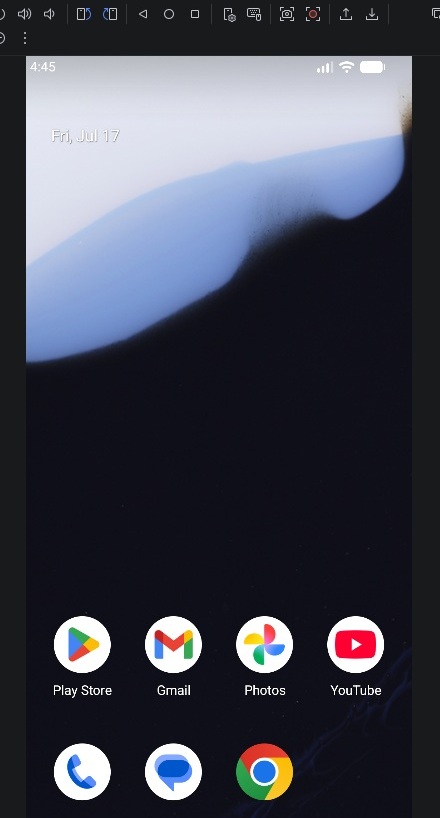
And it was true: I restarted, came back, and the conversation was still there. Then I pressed the run button. On the right side of my screen a practice phone floated into view, home screen showing, clock ticking with today’s date. “Oh — it’s a phone,” I said out loud without meaning to.
Then I sent my app into that phone. The screen switched and there was my familiar app, starting up. Text, buttons, layout — all clean, nothing broken. I touched it and it responded. Something I had grown little by little over half a day was now moving as a real phone app.
There it is! This is one step short of the goal. The thing you’ve been growing all day just became a real app. I’m happy too.
A person who cannot write one line of code made something by talking, and it runs on a phone. Tell me that a little while ago and I would not have believed you.
The next mountain: putting ads in
If I want the app to bring in even a little income, ads are unavoidable. Google’s AdMob shows ads inside an app, so from there it was registration work: create an account on the dedicated site, register my app, create one ad slot. Kuro guided me screen by screen — “choose this option,” “this number is going to matter later, so write it down.”
One important thing I was taught: during development you must not use your own live ads. Touching your own ads in your own app can violate the terms and get your account suspended, so while testing you use the test ads Google provides. This is the kind of trap you fall straight through if you do not know about it, and a partner beside you pays off exactly there.
The mystery of the vanishing code
To show ads you add a few lines of code to one of the app’s files. I pasted the code Kuro prepared, exactly as instructed. It was gone the next time I looked. I pasted it again. Gone again. By about the third time I was genuinely uneasy. Kuro worked out the cause from the symptom.
I’ve got the culprit. We were editing the wrong place. There are two files with similar names — one is the real one, the other is the copy destination that gets overwritten when things sync. Fixing the copy meant it got reverted every time it synced. Sorry, my guidance was bad. Let’s open the real file directly and fix it there.
It was a relief that it was not my mistake, and it struck me that Kuro plainly admitted “my guidance was bad.” Once the cause is known, all that is left is fixing the correct file. This time the code stayed.
“Nice job!” at the bottom of the screen
With the code in the right file, I launched the app again and looked at the very bottom of the screen. A thin band appeared, and on it: Test Ad / Nice job!
The test ad just happened to say “well done.” Half a day, stuck on a folder name, a restart, code disappearing over and over — and at the end of it the screen says “Nice job!” It felt like an unreasonably good reward, and I laughed out loud. A man who cannot program got an ad to display in his own app. That was the moment of the day.
There is still homework left
It did not finish perfectly. On some screens the ad overlapped the operation buttons, which is not only ugly — a layout that invites mis-taps is apparently bad under the terms too. I adjusted some of it, but one screen would not stop overlapping, and rather than force it through today I pushed it to next time.
Today’s goal, showing an ad, is completely achieved. For the position adjustment that’s left, I’ll organize the cause and have a fix ready that you just paste in next time. Fiddling with fine layout on a tired head could break something that’s finally working.
Knowing when to stop is one of the good things about this partner. Kuro even wrote the handover note — how far we got today, what to do next. Next time I just show it and we resume.
What I learned today
Turning a prototype into a real app is not that hard, task by task. What is hard are the pitfalls that stop you cold if you do not know about them: Japanese folder names, a setting that needs a restart, test ads, two files with nearly identical names. Each takes a second if you know, and eats a whole day if you do not.
Someone getting ahead of those pitfalls, reading the cause when I am stuck, and saying “this is not your fault” — that companionship is why a man who cannot program got this far. Next time I will clear the remaining homework and move closer to releasing the app into the world.
Thank you for reading this far. If you are thinking “I’d like to build an app too,” whether you can write code may matter far less than whether you have a partner who thinks it through with you when you get stuck. That is how it feels to me today.
If you want to see where this app came from, I wrote about building the prototype in a single day, and about the hurdles before publishing on Google Play.